Guest Communication Tips That Save Hours
Guest communication is the single biggest time drain for Airbnb hosts. Without automation, responding to messages, sending check-in instructions, answering FAQ questions, and requesting reviews takes 3-5 hours per week per property. Here is how that changes with automation:
| Task | Without Automation | With AI Automation | Time Saved |
|---|
| Guest message responses | 3-5 hours/week | 0 hours (AI handles) | 3-5 hours |
| Check-in instructions | 1-2 hours/week | Automated per booking | 1-2 hours |
| Pricing adjustments | 2-3 hours/week | Dynamic pricing tool | 2-3 hours |
| Cleaning scheduling | 1-2 hours/week | Auto-synced to calendar | 1-2 hours |
| Review requests | 30 min/week | Automated post-checkout | 30 min |
Set Up Automated Message Templates
Create pre-written messages for the 7 key touchpoints in every guest stay: booking confirmation, pre-arrival details, check-in instructions, welcome message, mid-stay check-in, check-out reminder, and review request. Most PMS tools and Airbnb's built-in scheduling can handle template-based delivery. For a complete walkthrough, see our guide on how to automate guest messages.
Use an AI Guest Assistant for Real-Time Responses
Templates cover scheduled messages, but guests also ask unexpected questions at all hours. An AI guest assistant handles these in real time -- responding to questions about parking, local restaurants, early check-in, and Wi-Fi troubleshooting instantly, in any language, 24/7. This is the single biggest time-saving upgrade most hosts can make, and it directly improves your Airbnb response rate metric.
How Can You Automate Your Airbnb Hosting?
Automate your Airbnb hosting by setting up four systems: automated guest messaging for check-in and FAQ handling, dynamic pricing tools that adjust rates daily, smart locks for keyless self-check-in, and a cleaning scheduling app synced to your booking calendar. These four automations typically save hosts 8-12 hours per week and reduce response time from hours to seconds.
Start with messaging automation -- it is the highest-impact, lowest-effort improvement. Then add dynamic pricing (tools like Pricelabs and Wheelhouse sync with your calendar automatically). Smart locks eliminate key handoff entirely, and iCal-synced cleaning apps like TurnoverBnB or Properly notify your cleaners the moment a guest checks out. Each system compounds: the more you automate, the more properties you can manage without proportionally increasing your time investment.
Pricing and Revenue Optimization Tips
Fixed pricing is leaving money on the table. Dynamic pricing tools like Pricelabs, Wheelhouse, and Beyond Pricing analyze local demand, competitor rates, events, and seasonality to adjust your prices daily. Most hosts see a 15-30% revenue increase within the first quarter of using dynamic pricing.
Beyond dynamic pricing, optimize your minimum stay settings (2-night minimums on weekends, 1-night during weekdays), set orphan day pricing to fill gaps, and use introductory pricing for new listings to build initial reviews quickly. For advanced pricing strategies, check out our guide on dynamic pricing strategy.
Cleaning and Turnover Efficiency
Cleaning coordination is the second-biggest time drain after guest communication. Build a system that runs without your constant involvement: create a standardized cleaning checklist with photos of how each room should look, use a turnover app synced to your booking calendar so cleaners are notified automatically, maintain a backup cleaner network (at least 2 alternates), and implement quality checks with photo verification after each clean.
The goal is zero-touch turnovers: the booking triggers the cleaning notification, the cleaner completes the checklist, uploads verification photos, and the next guest receives check-in instructions -- all without you lifting a finger.
Listing Optimization Tips for More Bookings
Your listing is your storefront. Professional photography is the single most impactful change you can make -- listings with professional photos earn up to 40% more revenue. Beyond photos, optimize your title with the formula: [Property Type] + [Unique Feature] + [Location]. Keep your description scannable with short paragraphs and bullet points for amenities.
Your response rate directly affects your search ranking. Airbnb rewards hosts who respond to 100% of inquiries within one hour. For a complete walkthrough of every optimization lever, see our listing optimization guide.
Want Alfred to Handle This for You?
Automate guest messaging, check-in instructions, and FAQ responses across all your properties -- in every language, 24/7.
How Alfred Saves Hosts 10+ Hours a Week
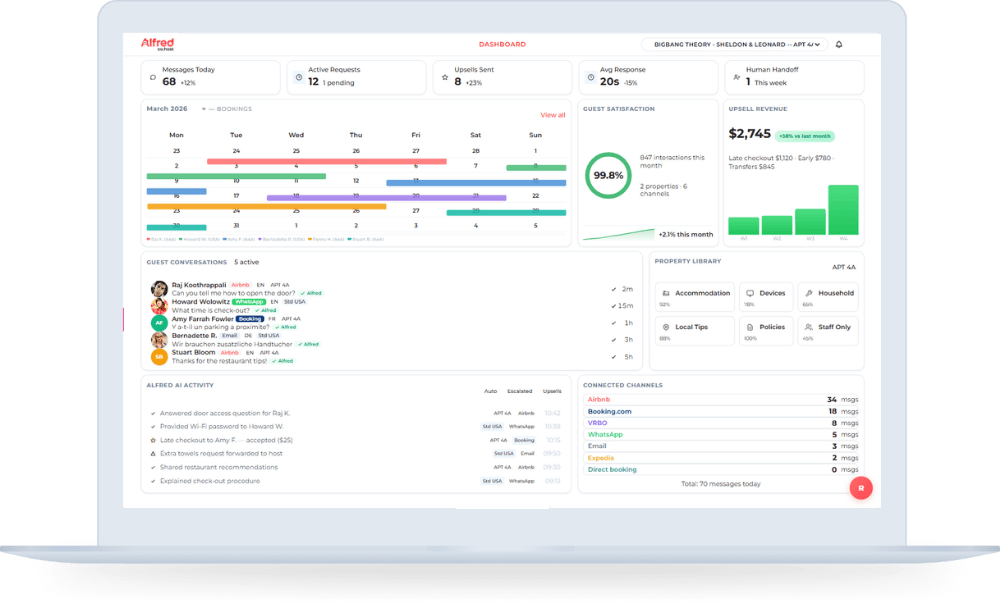
Alfred is the AI-powered automated front desk assistant built specifically for short-term rental hosts and hoteliers. It handles guest messaging across Airbnb, Booking.com, WhatsApp, and SMS -- responding to inquiries, sending check-in instructions, answering property-specific FAQs, and even managing upsells like early check-in or late checkout. Multi-language support means you serve international guests without needing multilingual staff.
The difference between Alfred and basic template tools is context awareness. Alfred understands the guest's question, draws on your property-specific information, and generates a personalized response in real time. For routine interactions, guests cannot tell they are messaging an AI concierge. For complex issues, Alfred escalates to you with full conversation context.
Start Hosting Smarter Today
The best Airbnb hosting tips share one theme: automate everything that does not require your personal touch. Guest messaging, pricing, check-in, and cleaning coordination can all run on systems -- freeing you to focus on guest experience and portfolio growth. If you are ready to reclaim 10+ hours a week, start with the highest-impact automation: an AI-powered receptionist that handles every guest message, in every language, 24/7. See Alfred pricing and see the difference in your first week.